
Finding Work
Track Your Applications
Applied to a few campaigns? Here is where to check what happened to each one.
In short
Click your name at the top → "My Activity". Pick the list that matches
what you applied for. Each application shows a status.
1
Open "My Activity"
At the top of the screen, click "My Activity". A small menu opens with a few lists.

2
Pick the right list
Choose the list that matches the type of collab you applied for. Not sure which is which? Check our Types of Collabs guide.
- My Jobs — Paid Campaigns you applied for
- My Barter — Free-product collabs you applied for
- My UGC Applications — Video/photo jobs you applied for
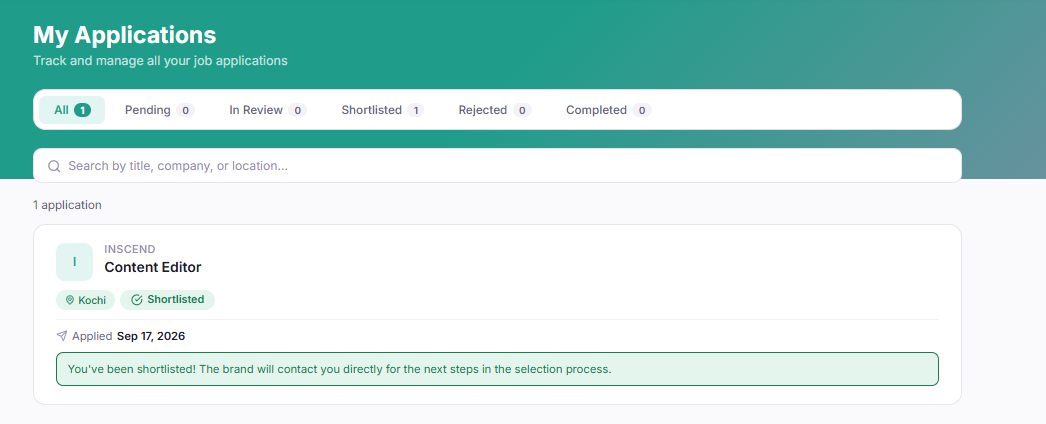
3
Understand the status labels
Every application shows a status word. Here is what each one means:
- Pending — The brand has not looked at it yet. Just wait.
- Approved — The brand said yes! Time to post your content and submit it.
- Rejected — The brand chose someone else this time. Try another campaign.
- Completed — You finished the collab and got paid (or received your product).
Two different "Withdraw" buttons: A "Withdraw"
button on an application cancels that application. It is not
the same as withdrawing your earnings to your bank. For moving
money, see Get Paid &
Withdraw Money.
Still stuck?
Our team is happy to help you directly. Reach out any time.